



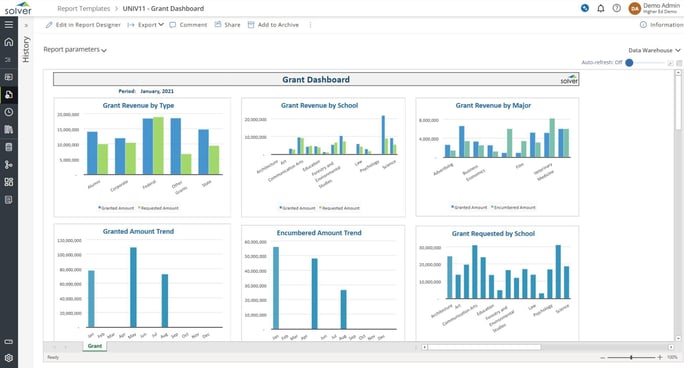
What is a Grant Dashboard? Grant Dashboards are considered analytical management tools and are used by grant managers and financial officers to analyze KPIs related to their grant activities. Some of the main functionality in this type of visualization report is that it gives six graphical views of important KPIs in this area. They include: 1) Granted vs requested revenue by type, 2) Granted vs requested revenue by school, 3) Granted vs requested revenue by major, 4) Grant amount trend, 5) Encumbered amount trend, and 6) Grant requested by school. Below the charts is a tabular report with the figures that support the charts. You find an example of this type of visualization report below.
Purpose of Grant Dashboards Universities and colleges use Grant Dashboards to offer managers an easy way to get a picture of grant requests and revenues from different viewpoints. When used as part of good business practices in a Financial Planning & Analysis (FP&A) department and in an Office of Contract and Grant Administration, a higher education institution can improve its grant strategies and policies, and it can reduce the chances that the decisions related grant revenues and requests are sub optimized.
Grant Dashboard Example Here is an example of a Grant Dashboard with requested and granted amounts as well as encumbrances.
Who Uses This Type of Visualization report? The typical users of this type of visualization report are: CFOs, budget managers, analysts, deans, grant managers. Other Visualization Reports Often Used in Conjunction with Grant Dashboards Progressive Financial Planning & Analysis (FP&A) and Office of Contract and Grant Administration departments sometimes use several different Grant Dashboards, along with detailed grant reports, encumbrance reports, grant budgets, sources and uses of funds statements and other management and control tools.
Where Does the Data for Analysis Originate From? The Actual (historical transactions) data typically comes from grant management software and enterprise resource planning (ERP) systems like: Microsoft Dynamics 365 (D365) Finance, Microsoft Dynamics 365 Business Central (D365 BC), Microsoft Dynamics AX, Microsoft Dynamics NAV, Microsoft Dynamics GP, Microsoft Dynamics SL, Sage Intacct, Sage 100, Sage 300, Sage 500, Sage X3, SAP Business One, SAP ByDesign, Acumatica, Netsuite and others. In analyses where budgets or forecasts are used, the planning data most often originates from in-house Excel spreadsheet models or from professional corporate performance management (CPM/EPM) solutions.
What Tools are Typically used for Reporting, Planning and Dashboards? Examples of business software used with the data and ERPs mentioned above are:
- Native ERP report writers and query tools
- Spreadsheets (for example Microsoft Excel)
- Corporate Performance Management (CPM) tools (for example Solver)
- Dashboards (for example Microsoft Power BI and Tableau)
To learn more, visit the Resource Library.