AI-Accelerated Salesforce Integration for Finance Teams
Salesforce holds the pipeline that drives next quarter's revenue, but that data often stays disconnected from the numbers finance plans and reports on. Solver's AI-accelerated xFP&A solution loads Salesforce data alongside your financial and operational data on one cloud platform, giving finance teams a single source of truth for reporting, budgeting, forecasting, and analysis.
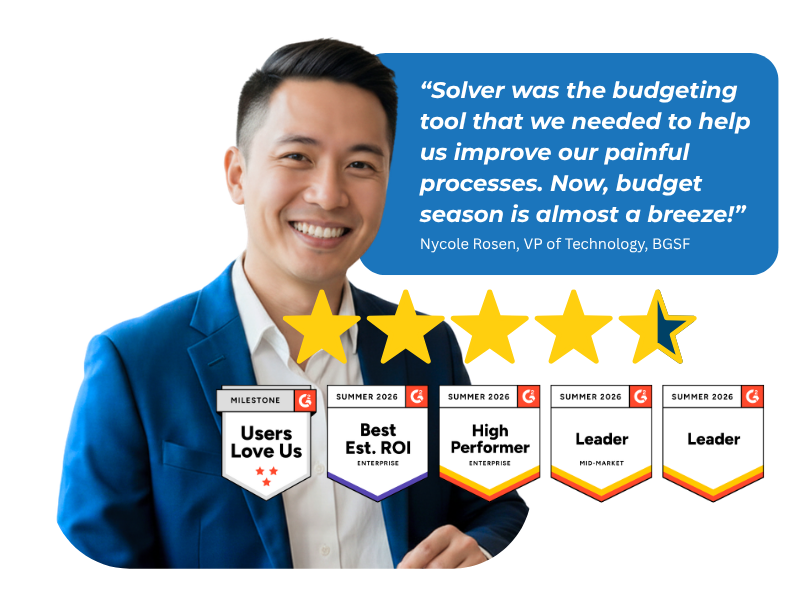
Based on customer reviews on
![]()
Your Salesforce Data, Ready for Finance
Solver's Salesforce connector uses the Salesforce API to connect and load data from your Salesforce system into Solver. Once loaded, sales data sits next to your financial and operational data, so planning, reporting, and analysis all start from the same numbers.
Salesforce API Connector
Connect to your Salesforce system through the Salesforce API and quickly load the data your team needs into Solver, without managing manual file exports.
QuickStart Integration for Salesforce
The patented QuickStart integration for Salesforce, paired with Template Marketplace content, gives your team a faster path from connection to working reports and plans.
Take the Salesforce Tour
Solver is built for Salesforce as an application for planning, reporting, and analysis. Watch the in-depth video series to see what Solver offers and how the QuickStart integration for Salesforce helps your team make better decisions.
What Solver Brings to Salesforce Data
Pipeline in Financial Context
See Salesforce pipeline next to revenue, costs, and budgets instead of in a separate sales report.
One Version of the Numbers
Sales and finance work from a single source of truth, so forecasts and reports stop conflicting.
Fewer Manual Exports
Replace spreadsheet downloads and copy-paste with a direct connection that keeps Salesforce data consistent across reports and plans.
Faster Response to Change
Model scenarios and run simulations on sales assumptions when the market shifts, before you commit budget.
Insight Beyond Finance
Share Salesforce-informed results with sales leaders and executives across the organization.
No Infrastructure to Manage
Solver runs in the cloud, so there is no software or hardware to install or maintain.
Sales Data Belongs in the Financial Plan
Connected, Not Copied.
Salesforce tracks the opportunities that shape future revenue, yet that data often lives apart from the general ledger. Finance teams export it, rebuild it in spreadsheets, and reconcile versions by hand. Solver loads Salesforce data through the Salesforce API and combines it with your financial and operational data in one place, so budgets, forecasts, and reports reflect what sales is seeing.
Reporting, Consolidation, Budgeting, and Analysis for Salesforce
Put Salesforce sales data to work in the processes finance runs every month.
-
Financial Reporting
-
Reports and budget forms designed in Solver's Excel add-in
-
Sales and pipeline reports alongside financial results
-
Detailed reports generated in one place
-
Advanced reporting that supports data-driven decisions
-
-
Consolidation
-
Salesforce, financial, and operational data consolidated in a single tool
-
Streamlined reporting and analysis across every connected source
-
One source of truth for decision-making
-
-
Budgeting & Forecasting
-
Dynamic driver-based budget and forecast models
-
Automated budgeting and forecasting processes
-
Scenario modeling and simulations
-
Planning tools built to improve prediction accuracy
-
-
Analysis
-
What-if scenarios to compare financial strategies
-
Complex data visualized in easy-to-share graphs and dashboards
-
Insights accessible across your organization
-
Why Finance Teams Call Solver a Leader in FP&A
G2 users recognize Solver as a Leader for financial planning and analysis, with finance professionals across nonprofit, manufacturing, distribution, and dozens of other industries relying on it daily. Whether you're a mid-market team or a global enterprise, Solver gives you one platform to budget, report, consolidate, and analyze with confidence. Nycole Rosen, VP of Technology at BGSF, put it plainly: "Now, budget season is almost a breeze."
Ready to Connect Solver to Salesforce?
Solver for Salesforce | Frequently Asked Questions
-
What does Solver add to Salesforce for finance teams?
Solver adds extended financial planning and analysis (xFP&A) to the sales data you manage in Salesforce. Solver's AI-accelerated xFP&A solution loads Salesforce data alongside your financial and operational data on one cloud platform, so finance teams can report on pipeline next to financial results, build driver-based forecasts, and share insights beyond the finance department.
-
How is Solver different from exporting Salesforce data to Excel?
An export is a static copy that needs manual updates and reconciliation every time the numbers change. Solver keeps the Excel experience your team knows through its Excel add-in, but connects reports and budget forms to Salesforce data loaded through the Salesforce API. Your team works from a single source of truth instead of a collection of disconnected spreadsheets.
-
How does Solver connect to and load data from Salesforce?
Solver's Salesforce connector uses the Salesforce API to connect and load data from your Salesforce system into Solver. From there, Salesforce data is combined with your financial and operational data for reporting, budgeting, forecasting, and analysis. The patented QuickStart integration for Salesforce helps your team move from connection to working reports and plans faster.
-
Can Solver combine Salesforce data with my ERP and financial data?
Yes. Solver consolidates your key data sources into a single tool, so Salesforce data can sit alongside financial data from your ERP and other operational systems. Finance teams can then build reports, budgets, and dashboards that connect pipeline activity to revenue, costs, and plans, with one source of truth for decision-making.
-
How long does it take to set up Solver for Salesforce?
The QuickStart integration for Salesforce and ready-to-use Template Marketplace content are designed for rapid deployment, so teams can start working with Salesforce data sooner. Your overall timeline depends on the data sources, reports, and planning models in scope. Your Solver team or implementation partner will confirm a timeline during scoping.
-
Can I model scenarios with Salesforce data in Solver?
Yes. Solver supports dynamic driver-based models and what-if scenarios, so you can test how changes in sales assumptions affect budgets and forecasts before you commit. Run simulations to respond quickly to market shifts, then share results through graphs and dashboards that make insights accessible across your organization.