

Solver-markedsplads
Udforsk efter funktionalitet (rapporter, planlægning og dashboard-skabeloner), eller brug søgefunktionen til at filtrere efter integration, branche eller for at finde en skabelon, der passer til dine specifikke behov. Gem skabeloner på din favoritliste, og brug linket »Del favoritter« til at dele listen med andre.
Ikonforklaring:
💲 Kræver konsulenttimer til opsætning og konfiguration
⭐ Gem som favorit og del med andre
FUNCTIONALITY
- Reports
- Planning
- Dashboard
Data Source
Marketplace Data Source: Filter by Data Source to find assets specific to your system
Showcase Data Source: Filter by Data Source to find assets specific to your system
Industries
Marketplace Industries: Filter by Industries to find assets specific to your system
Showcase Industries: Filter by Industries to find assets specific to your system
industries
Marketplace Industries: Filter by your industry to find assets created for your specific needs
Showcase Industries: Filter by your industry to find assets created for your specific needs
265 - 270 of 868 Results
Favorite Page Results
Favorites


Reports
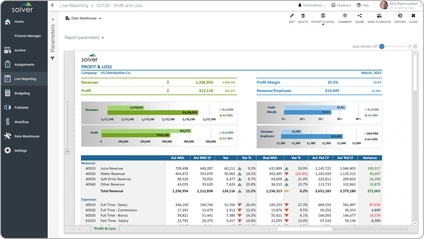
Distribution – Profit & Loss Report
Profit & loss (P&L) It gives the user a quick view of P&L KPIs followed by a detailed, comparative view of revenues, expenses and profit margins.
$
Dashboard
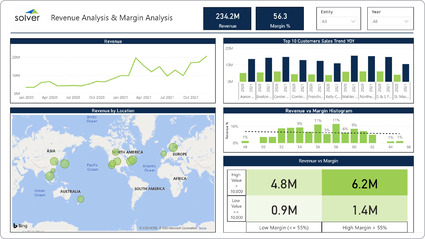
Distribution – Revenue and Margin Analysis
It provides six different views of sales and margin KPIs, including:. Revenue and gross Margin %,. Multiyear revenue trend,.
$
Reports
Reports
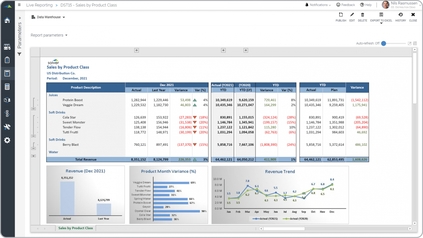
Distribution – Sales by Product Class
It is parameter-driven and the user can run it for any time period. Items are listed down the rows and they are grouped by item (product) class.
$
Reports
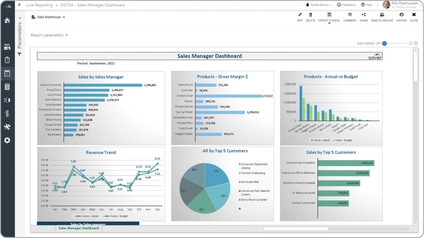
Distribution – Sales Manager Dashboard
It provides six visualizations for KPI analysis:. Sales by sales manager,. Gross margin by product,.
$
Reports
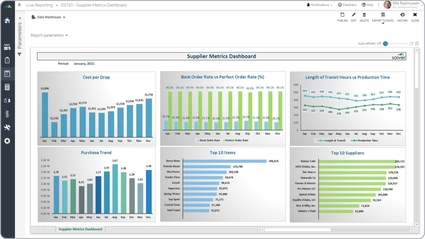
Distribution – Supplier Metrics
It is parameter-driven and helps the user analyze the company's suppliers from six perspectives.
$