

A rapidly increasing number of mid-market organizations are implementing Microsoft Dynamics 365 Finance (D365 Finance) as their new cloud ERP system. If you are considering a migration to D365 Finance, there are a few key things to do: make sure the solution fits your needs; and determine if your company should also consider any best-of-breed add-on solutions to automate certain processes key to your business. When companies consider migrating their accounting solution from on-premise servers to the cloud, the decision usually relies on the solution’s ability to automate and streamline accounting and finance processes. To ensure this occurs, companies not only have to review core ERP functionality to make sure it meets their current and future needs but must also determine the tools to use for reporting, planning, and analyses. Some of these functions can be found natively in Dynamics 365 Finance while others, like dashboards for data visualization, are embedded or connected apps.
This blog will focus on best-of-breed budgeting and forecasting apps that are pre-integrated with D365 Finance. The information below includes some tips you may want to consider to ensure your ROI and Dynamics 365 experiences are optimized when it comes to producing:
- Annual budgets
- Monthly or quarterly forecasts
- What-if analysis and scenario modeling
- Strategic goals to drive your planning process
D365 Finance’s budgeting functionality enables basic budget input. However, as with almost any other cloud ERP system’s native planning tools, this inherent functionality is not the typical tool budgeting managers prefer to use to oversee a complete annual budget process or to produce a forecast. This showcase of planning input forms and report templates includes several hundred budgeting, forecasting and report examples. The sheer volume of options gives you an idea of the breadth and depth of capabilities found with professional corporate performance management (CPM) tools. Tools that can help you optimize planning processes and related decision-making in your business. While many Microsoft Dynamics 365 customers supplement their budgeting and forecasting tasks with home-grown Excel models, it becomes obvious when manual Excel models no longer are the right tools for your planning processes. Typical signs of Excel pain include problems like:
- Errors with formulas and links
- No workflow
- Lack of elegant versioning (separating budget versions)
- Long duration (often 2+ months) of the budget process due to lack of automation
- Lack of user security (especially for salary budgets, etc.)
- Inability to perform web-based input so files need to be shared and collected
- Painfully slow and inflexible budget consolidation and reporting options
- Employee payroll (with taxes and benefits)
- Capital expenses (with calculation of depreciation)
- Sales budget (by salesperson and/or customer, product/service)
- Profit & Loss (revenues and operating expenses)
- Balance sheet with automated or semi-automated Cash Flow budgets
- Usually gets you there: Generic integration tools that require a lot of skills and time to configure.
- Works but often with limitations: Connectors specifically built for Dynamics 365 Finance, but do not include an app that configures dimensions and views in Dynamics nor pre-maps to popular fields to “light them up” for its API.
- Quickest and easiest: Connectors specifically built for Dynamics 365 Finance and that include an app or script(s) that properly and automatically configure dimensions and views in Dynamics. Then it exposes them to its API, including pre-mapped popular dimensions and data. You can see an example of this type of integration here.
What Is a Template Marketplace and Why Is It Important to Your Business?
By now, most best-of-breed planning solutions have followed D365 Finance and other popular ERPs to the cloud. They offer modern and flexible functionality to collect the budget and forecast data that your executives need. However, they still have at least one big deficiency: Somebody must design those input forms and adapt them to your Dynamics chart of accounts and other key dimensions. This can be very painful when you include the time and cost involved, especially if you still remember the effort it took to get all required templates and reports up and running in your old legacy on-premise ERP system. These days, there is a growing trend for cloud business solutions to offer pre-built apps such as reports, input forms, connectors, and more in their own Marketplaces. Typically, app installations only involve a few clicks to install from a marketplace. This is not that different from apps you are used to downloading to your iPhone or Samsung phone. For example, in Solver’s Marketplace (see screenshot below), users can download planning input templates, financial reports and more than 50 pre-built financial dashboards that plug right into your Power BI web service.
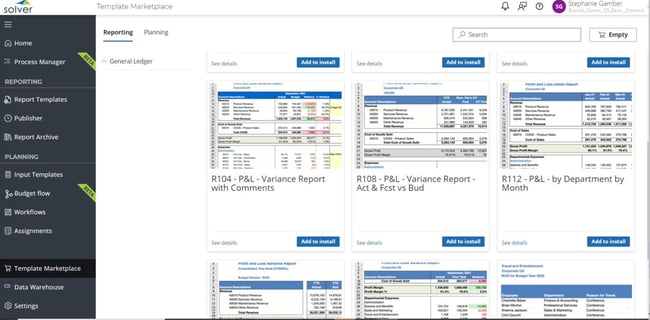
Rapid deployment of Budgeting and Forecasting Tools for Microsoft Dynamics 365 Finance
In other words, with true marketplace templates you should be able to provide your managers with at least a set of General Ledger account-level budgeting and forecasting templates the same day you install the planning tool! Now that’s a quick deployment!
Summary
For new or existing Dynamics 365 Finance customers, the 2020s hold a lot of promise. Microsoft is continuously improving and updating their ERP system, and there is a rapidly growing ecosystem of third-party apps that further enhance the benefits of D365 Finance. Picking the right solutions, for planning as an example, can significantly improve your processes, save you time, and help drive faster and better decisions by putting the right information in front of your managers and executives when and where they need it.
TAGS: Reporting, Planning, Forecasting, Budgeting, Fp&a, Kpis, Erp, Dashboards, Partners, Financial reporting, Compare fp&a