AI-Accelerated OData Integration for Finance Teams
Not every business system has a dedicated Solver integration, but many provide an OData service. Solver's OData connector links those systems to an AI-accelerated xFP&A solution, bringing planning, reporting, consolidation, and analysis onto one cloud platform and giving finance and operational leaders a single source of truth.
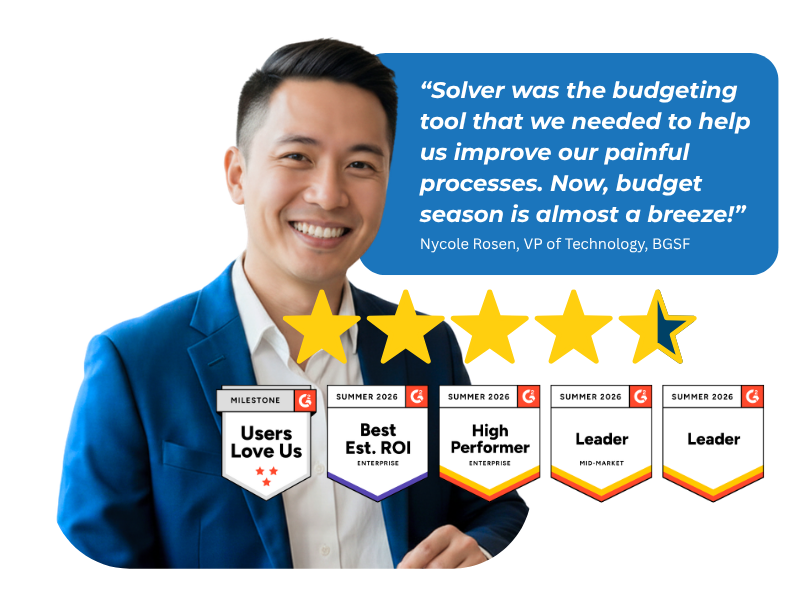
Based on customer reviews on
![]()
A Standard Path from Your System to Solver
Solver is built for OData-enabled systems. If your business system is not listed among Solver's integrations but provides an OData service with basic authentication support, the OData connector may enable you to connect it to Solver.
What OData Is
OData (Open Data Protocol) is an OASIS standard, approved by ISO/IEC, that defines best practices for building and consuming RESTful APIs. Because it standardizes how systems expose data, OData gives Solver a consistent way to reach business data across many different applications.
When to Use the OData Connector
Choose the OData connector when your system offers an OData service but does not appear on Solver's integrations list. Authentication requirements differ by system, and the connector may not support every authentication method, so contact Solver Support to confirm fit for your environment.
Take the OData Tour
See what Solver offers in an in-depth video series, including how the QuickStart integration for OData helps your team move from connected data to better decisions.
What Solver Delivers on OData-Sourced Data
Excel-Native Report and Form Design
Build reports and budget input forms in Solver's Excel add-in, then run them on data pulled through your OData connection.
Reporting That Supports Decisions
Use advanced reporting capabilities to turn OData-sourced figures into financial and operational reports leaders can act on.
One Tool for Every Source
Consolidate your key data sources into a single tool, so OData data sits alongside ERP, CRM, and operational data for streamlined reporting and analysis.
Driver-Based Budgets and Forecasts
Automate time-consuming budgeting and forecasting with dynamic, driver-based models instead of manually rebuilt spreadsheets.
Scenario Modeling on Demand
Model what-if scenarios and run simulations to find the most effective financial strategy as market conditions change.
Dashboards Built to Share
Visualize complex data in graphs and dashboards that are easy to share, so insights reach teams across your organization.
Finance Data That Lives Outside the Standard Integration List
Exports Are Not a Data Strategy.
Many organizations run financial or operational data in systems that do not have a dedicated Solver integration. Without a direct connection, finance teams export files, reformat them in Excel, and rebuild the same reports every cycle, which slows close and planning and leaves room for version errors. When those systems provide an OData service, Solver's OData connector gives finance a standards-based route into an AI-accelerated xFP&A solution, so budgets, reports, and dashboards draw from one governed set of numbers.
Plan, Report, and Analyze with Connected OData Data
Each core finance process can use your OData-sourced data alongside the rest of your business data.
-
Financial Reporting
-
Financial and operational reports designed in the Solver Excel add-in
-
Reports built on connected OData data instead of manual exports
-
Reports shared with business users through the Solver web portal
-
-
Consolidation
-
OData data combined with other key data sources in one tool
-
Multi-entity rollups with automated elimination entries
-
Built-in currency translation
- Audit controls that track every change
-
-
Budgeting & Forecasting
-
Dynamic, driver-based budget and forecast models
-
What-if scenarios and simulations
-
Unlimited budget versions
-
Workflow and approvals for budget input
-
-
Analysis
-
Dashboards in Excel or Power BI
-
Easy-to-share graphs for leaders across the organization
-
Trend analysis and anomaly detection with the Analysis Agent (available in the United States)
-
Why Finance Teams Call Solver a Leader in FP&A
G2 users recognize Solver as a Leader for financial planning and analysis, with finance professionals across nonprofit, manufacturing, distribution, and dozens of other industries relying on it daily. Whether you're a mid-market team or a global enterprise, Solver gives you one platform to budget, report, consolidate, and analyze with confidence. Nycole Rosen, VP of Technology at BGSF, put it plainly: "Now, budget season is almost a breeze."
Ready to Connect Solver to OData?
Solver for OData | Frequently Asked Questions
-
What is the Solver OData connector?
The Solver OData connector lets organizations connect business systems that provide an OData service to Solver, an AI-accelerated xFP&A solution. It is intended for systems that are not listed among Solver's dedicated integrations, giving finance teams a standards-based way to bring that data into planning, reporting, consolidation, and analysis on one cloud platform.
-
Which systems can connect to Solver through OData?
Systems that provide an OData service with basic authentication support may be able to connect to Solver through the OData connector. Authentication requirements differ by system, and the connector may not support every authentication method. Contact Solver Support to confirm whether your system and its authentication setup are a fit before you begin.
-
How is Solver different from Excel for reporting on OData data?
Solver keeps the Excel design experience finance teams know while removing the manual work of exporting, reformatting, and combining files. Reports and budget forms run on data connected through OData, driver-based models automate forecasting, and audit controls track every change, so leaders work from a single source of truth instead of competing spreadsheet versions.
-
Can I combine OData data with other data sources in Solver?
Yes. Solver includes a data warehouse that supports unlimited data sources, so data connected through OData can sit alongside ERP, CRM, payroll, and other operational data. Finance and department leaders can then report, plan, and analyze across those sources in one tool rather than reconciling separate systems by hand.
-
How long does it take to implement Solver with an OData connection?
Solver's QuickStart integration and ready-to-use templates are designed for rapid deployment. Your timeline depends on your source system, its OData service and authentication setup, and the number of entities, data sources, and custom models in scope. Your Solver team or implementation partner will confirm a timeline during scoping.
-
How does Solver Copilot AI work with OData-sourced data?
Solver Copilot AI includes two agents. The Help Agent answers product and application questions instantly. The Analysis Agent provides chart generation, anomaly detection, trend analysis, and predictive recommendations on data in Solver, including data connected through OData. Solver Copilot is built on OpenAI GPT within Microsoft Azure, and user input never trains the model. Available in the United States.