



 Add to favorite



Media – Subscriber Analysis
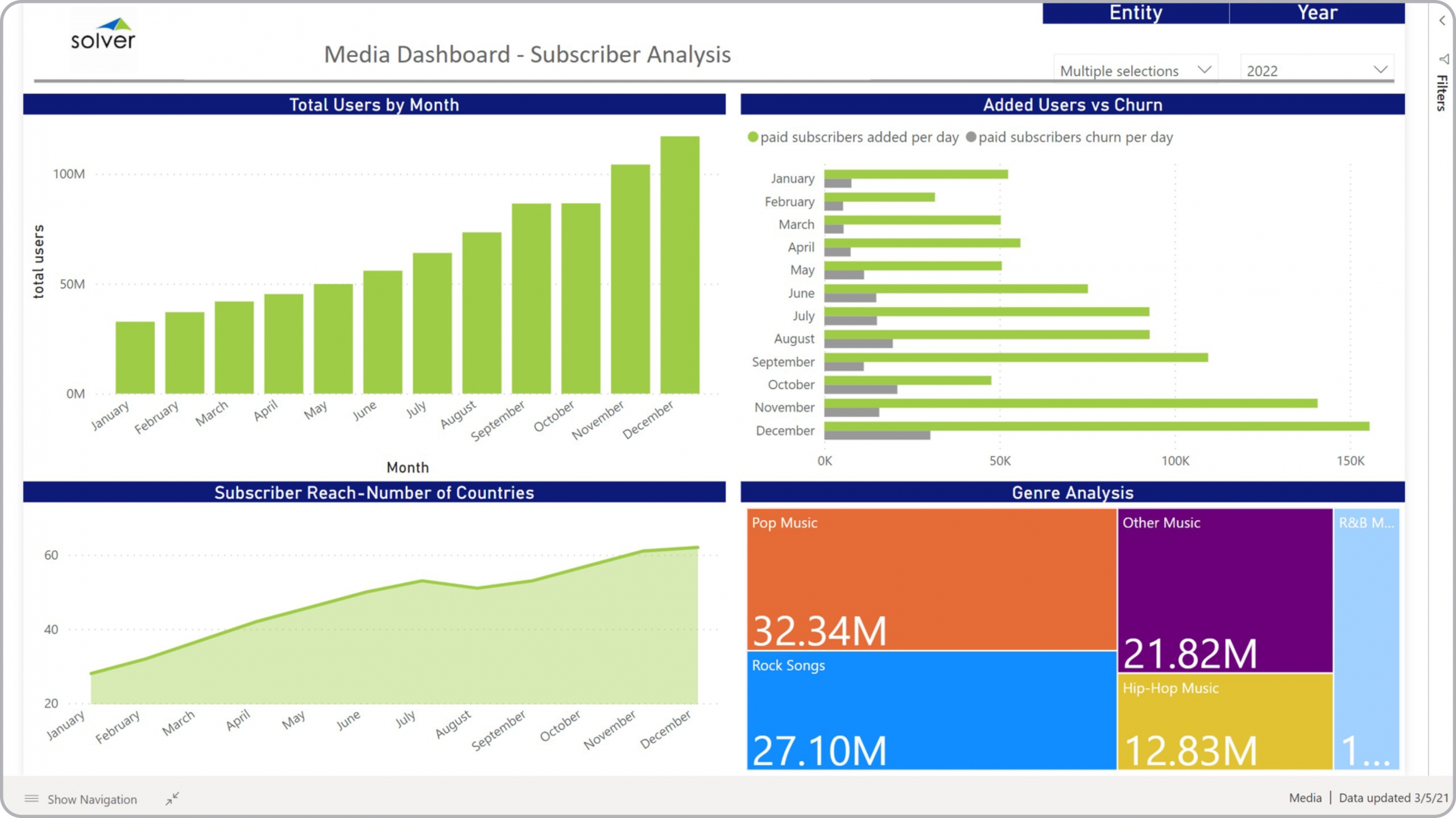
What is a Subscriber Dashboard? Subscriber Dashboards are considered operational analysis tools and are used by executives, media and marketing managers to get important insights into subscriber KPIs, content preferences and trends. Some of the main functionality in this type of dashboard is that it provides analysis of user KPIs from four different perspectives, including: 1) Monthly trend in total number of users, 2) Number of added users and churn per day, 3) Subscriber reach by country (region/geography), and 4) Number of subscribers per genre. The filters on top of the dashboard enables slicing by year and station/business unit. You find an example of this type of dashboard below.
Purpose of Subscriber Analysis Dashboard Media companies use Subscriber Analysis Dashboard to get a clear picture of the key user (subscriber) trends that drives the success of the company. When used as part of good business practices in Product and Marketing departments, a company can grow revenues by improving offerings and Go-To-Market tactics, and it can reduce the chances that managers are lacking visibility to subscriber churn and content preferences.
Who Uses This Type of Dashboard? The typical users of this type of dashboard are: Executives, category managers, media managers, sales managers, marketing managers. Other Reports Often Used in Conjunction with Subscriber Analysis Dashboard Progressive Product and Marketing departments sometimes use several different Subscriber Analysis Dashboard, along with detailed subscriber reports, churn reports, financial statements, financial dashboards, sales forecasts, annual budgets and other management and control tools.
Where Does the Data for Analysis Originate From? The Actual (historical transactions) data typically comes from media traffic systems and enterprise resource planning (ERP) systems like: Microsoft Dynamics 365 (D365) Finance, Microsoft Dynamics 365 Business Central (D365 BC), Microsoft Dynamics AX, Microsoft Dynamics NAV, Microsoft Dynamics GP, Microsoft Dynamics SL, Sage Intacct, Sage 100, Sage 300, Sage 500, Sage X3, SAP Business One, SAP ByDesign, Acumatica, Netsuite and others. In analyses where budgets or forecasts are used, the planning data most often originates from in-house Excel spreadsheet models or from professional xFP&A solutions.
Built for media finance teams and aligned with Solver's xFP&A platform, this Solver report template connects directly to your ERP data via the Solver Data Warehouse, enabling near real-time analysis with minimal setup. Designed for QuickStart deployment, it can be activated rapidly so your team can focus on analysis and decisions — not data preparation.
What is the Media – Subscriber Analysis in Solver? The Media – Subscriber Analysis is a pre-built xFP&A report template in Solver designed for media organizations. It delivers key financial and operational metrics in a single, easy-to-use interface — purpose-built for media finance workflows.
Who uses this Solver report template? Finance leaders at media organizations — including CFOs, FP&A managers, and media finance teams — use this template to get fast, reliable answers without waiting on IT or building custom reports. It supports both day-to-day monitoring and strategic decision-making.
Where does the data come from? Data is sourced automatically from your ERP system through the Solver Data Warehouse, which integrates with platforms such as Microsoft Dynamics 365 Business Central, Dynamics 365 Finance, Acumatica, Sage Intacct, and other leading ERP solutions. CRM and subscription billing platforms can also be connected for a unified view of subscription and advertising revenue. Once connected, the template updates in near real-time with no manual data entry required.
To learn more, visit the Resource Library.