



 Add to favorite



Higher Ed – Enrollment Analysis
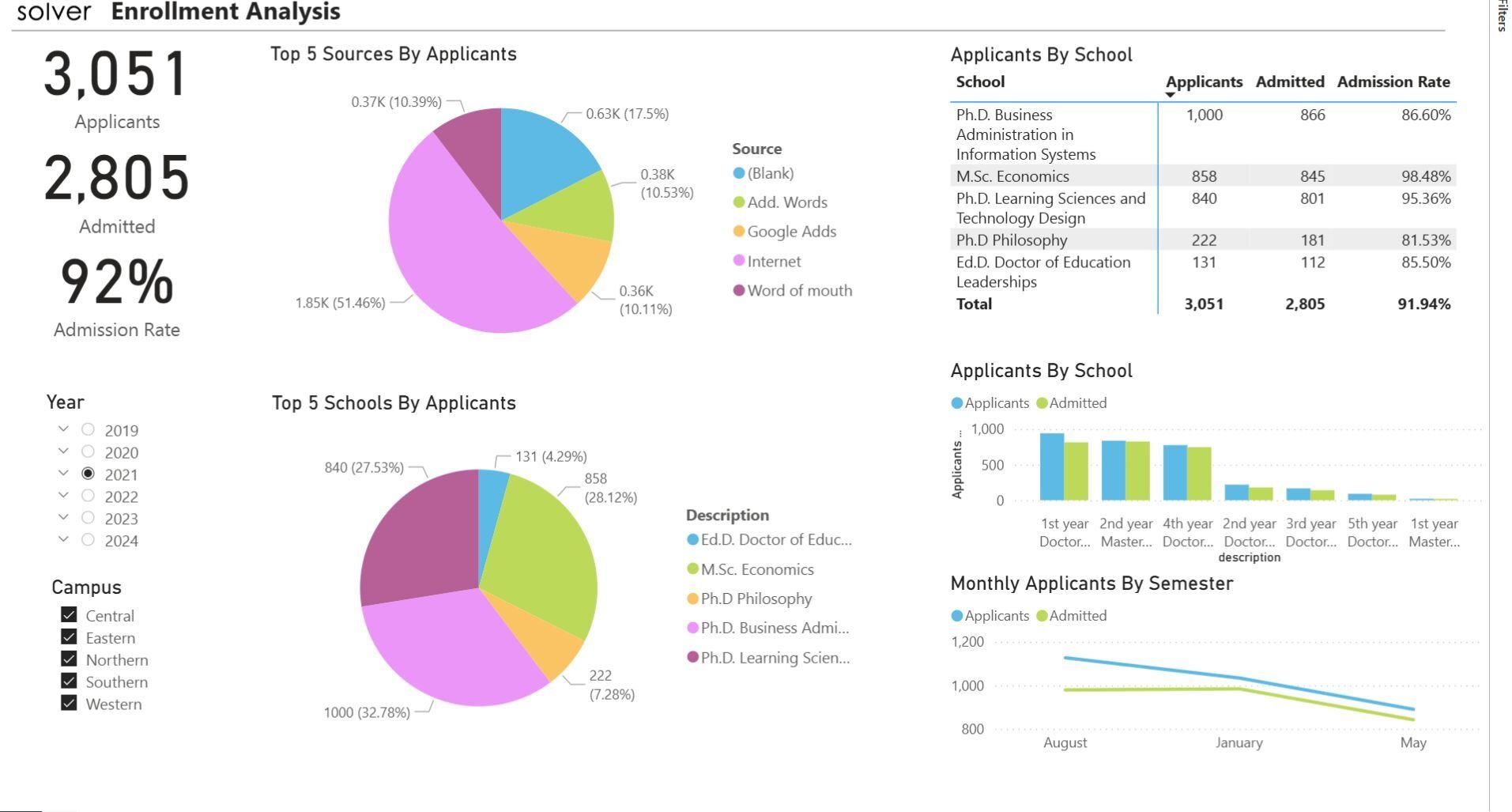
What is a Student Enrollment Dashboard? Enrollment Dashboards are considered student body analysis tools and are used by Enrollment Officers and University Administrators to monitor enrollment statistics. Some of the main functionality in this type of dashboard is that it enables analysis of the incoming student population from six different perspectives: 1) KPIs with Total applicants, Admitted students, and Admission rate (%), 2) Top five recruiting sources by number of applicants, 3) Top five schools by applicants, 4) Table with applicants by school with metrics for applicant numbers, admitted students, and admission rate, 5) Applicants by school ranked by number of applicants, and 6) Applicant and admission trend by semester. The user can filter the dashboard by year and campus using the parameters on the left side of the screen. You find an example of this type of dashboard below.
Purpose of Student Enrollment Dashboards Universities and colleges use Student Enrollment Dashboards to give administrators an easy way to monitor enrollment trends and statistics. When used as part of good business practices in Enrollment and Academic departments, an organization can improve its student-related strategies including recruiting and academic offerings, and it can reduce the chances that poor visibility to essential enrollment KPIs leads to sub-optimal policies and planning.
Who Uses This Type of Dashboard? The typical users of this type of dashboard are: University officials, boards, enrollment officers, recruiting officers, strategic planners, academic officers, student administrators. Other Reports Often Used in Conjunction with Student Enrollment Dashboards Progressive Enrollment and Academic departments sometimes use several different Student Enrollment Dashboards, along with Detailed enrollment reports, academic summary reports, financial dashboards, annual budgets and other management and control tools.
Where Does the Data for Analysis Originate From? The Actual (historical transactions) data typically comes from student information systems and enterprise resource planning (ERP) systems like: Microsoft Dynamics 365 (D365) Finance, Microsoft Dynamics 365 Business Central (D365 BC), Microsoft Dynamics AX, Microsoft Dynamics NAV, Microsoft Dynamics GP, Microsoft Dynamics SL, Sage Intacct, Sage 100, Sage 300, Sage 500, Sage X3, SAP Business One, SAP ByDesign, Acumatica, Netsuite and others. In analyses where budgets or forecasts are used, the planning data most often originates from in-house Excel spreadsheet models or from professional xFP&A solutions.
Built for higher education finance teams and aligned with Solver's xFP&A platform, this Solver report template connects directly to your ERP data via the Solver Data Warehouse, enabling near real-time analysis with minimal setup. Designed for QuickStart deployment, it can be activated rapidly so your team can focus on analysis and decisions — not data preparation.
What is the Higher Ed – Enrollment Analysis in Solver? The Higher Ed – Enrollment Analysis is a pre-built xFP&A report template in Solver designed for higher education organizations. It delivers key financial and operational metrics in a single, easy-to-use interface — purpose-built for higher education finance workflows.
Who uses this Solver report template? Cfos, controllers, and higher education finance teams in higher education organizations rely on this Solver report template to replace manual spreadsheet-based processes with automated, near real-time analysis. It is especially useful during month-end close, budget cycles, and board reporting.
Where does the data come from? Data is sourced automatically from your ERP system through the Solver Data Warehouse, which integrates with platforms such as Microsoft Dynamics 365 Business Central, Dynamics 365 Finance, Acumatica, Sage Intacct, and other leading ERP solutions. Once connected, the template updates in near real-time with no manual data entry required.
To learn more, visit the Resource Library.