



 Add to favorite



GL Dashboard – 8 Quarter Balance Sheet Trend
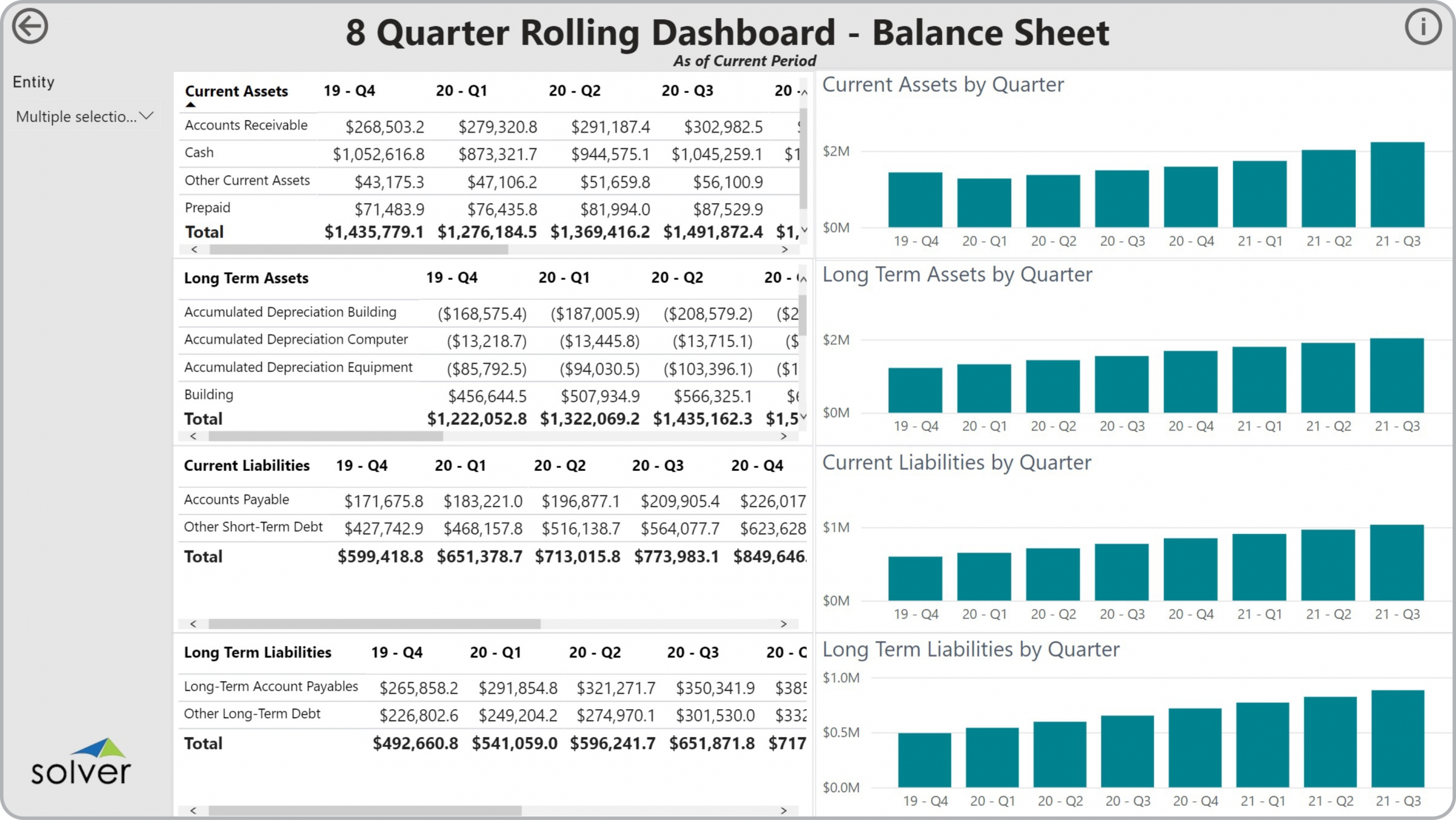
Who uses 8 Quarter Rolling Balance Sheet Dashboards and What are Some Key Analytical Features? In today’s fast-paced business environment, CFOs are under high pressure to supply end users like accountants and analysts with timely and concise Financial Dashboards. Companies use key features like the ones below to support their users with effective analysis that helps drive risk control and investment optimization:
- Asset and Liability tables with metrics by GL account
- Quarterly trend charts for Current Assets, Long Term Assets, Current Liabilities and Long Term Liabilities
- Period, company and other filters that dynamically drives the dashboard
A Brief Description of the 8 Quarter Rolling Balance Sheet Dashboard Template Financial Dashboards like the one seen in the image above are interactive and parameter driven and typically contain sections with interactive charts and indicators to analyze quarterly trends for any asset and liability GL account and sub-total. One of the important features that aid the user in the analysis process is the ability to instantly zoom in on any asset or liability by clicking on a row in the tables and see that item highlighted in the trend charts. 8 Quarter Rolling Balance Sheet Dashboards are often used in conjunction with balance sheet and cash flow reports, KPI dashboards, and cash flow budgets.
Data Integration to Transaction Systems Most organizations these days want automated and streamlined planning, reporting and analysis. However, many of the benefits described earlier rely on best of breed extended financial planning and analysis (xFP&A) tools and/or Business Intelligence (BI) capabilities as well as data marts or data warehouses that use pre-built integrations to the organization’s ERP system. Oftentimes, they also need integrations to other key data sources like CRM, subscription systems, payroll tools, etc. Modern, cloud-based ERPs like Microsoft Dynamics 365 Finance (D365 Finance), Microsoft Dynamics 365 Business Central (D365 BC), Sage Intacct, Acumatica, Netsuite and SAP have robust APIs which allow for dynamic integrations to xFP&A and BI tools that are fully automated and flexible to run on a schedule or on-demand.
This Solver dashboard template connects directly to your ERP data via the Solver Data Warehouse, enabling near real-time analysis with minimal setup. Designed for QuickStart deployment, it can be activated rapidly so your team can focus on analysis and decisions — not data preparation.
What is the GL Dashboard – 8 Quarter Balance Sheet Trend in Solver? The GL Dashboard – 8 Quarter Balance Sheet Trend is a pre-built xFP&A dashboard template in Solver that delivers key financial and operational metrics in a single, easy-to-use interface, eliminating the need for manual data work or custom report development.
Who uses this Solver dashboard template? Cfos, fp&a managers, and business unit leaders use this Solver dashboard template to replace static spreadsheet reports with interactive, near real-time analysis. It supports both ongoing monitoring and ad hoc deep-dives into performance data.
Where does the data come from? Data is sourced automatically from your ERP system through the Solver Data Warehouse, which integrates with platforms such as Microsoft Dynamics 365 Business Central, Dynamics 365 Finance, Acumatica, Sage Intacct, and other leading ERP solutions. Once connected, the template updates in near real-time with no manual data entry required.