



 Add to favorite



P&L – Trended with Accounts by Department
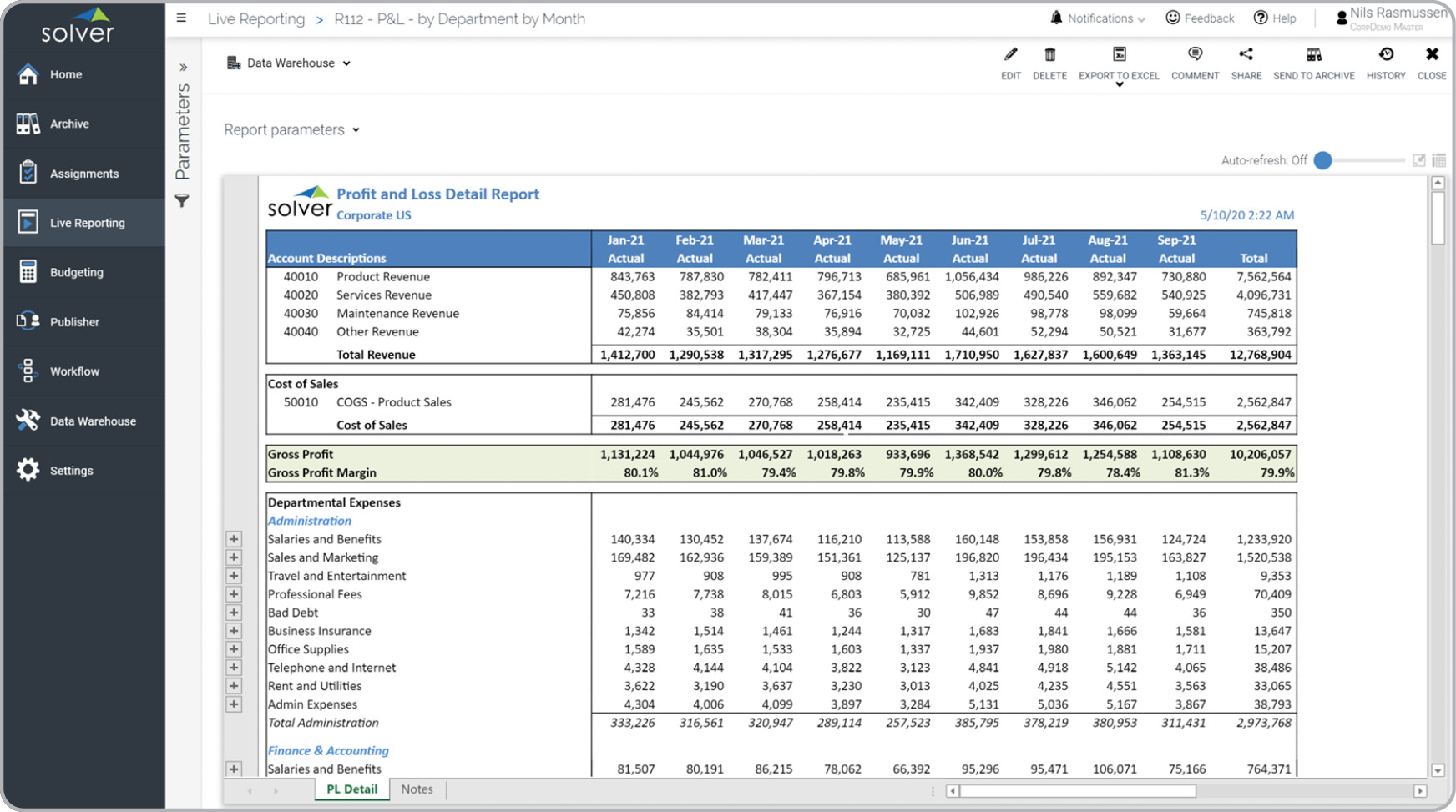
What is a Profit & Loss Report with Monthly Trend? Trend-based Profit & Loss reports are considered important for analysis and are often used by CFOs and financial managers to look for upward or downward swings in the business. Key functionality in this type of report can dynamically display historical data for each month of the fiscal year up to the current period for which the user is running the report. You will find an example of this type of report below.
Purpose of Trended Profit & Loss Reports Companies and organizations use Trended Profit & Loss Reports to get a side-by-side comparison of monthly results for the current year without having to run a single period report multiple times. When used as part of good business practices in a Financial Planning & Analysis (FP&A) Department, a company can improve its ability to quickly detect trends in revenues, expenses and profitability, as well as, reduce the possibility that important exceptions or shifts in the business go undetected.
Who Uses This Type of Report? The typical users of this type of report are: Executives and Financial Managers. Other Reports Often Used in Conjunction with Trended Profit & Loss Reports Progressive Financial Planning & Analysis (FP&A) Departments sometimes use several different Trended Profit & Loss Reports, along with trended balance sheets, cash flow statements and other management and control tools.
Where Does the Data for Analysis Originate From? The Actual (historical transactions) data typically comes from enterprise resource planning (ERP) systems like: Microsoft Dynamics 365 (D365) Finance, Microsoft Dynamics 365 Business Central (D365 BC), Microsoft Dynamics AX, Microsoft Dynamics NAV, Microsoft Dynamics GP, Microsoft Dynamics SL, Sage Intacct, Sage 100, Sage 300, Sage 500, Sage X3, SAP Business One, SAP ByDesign, Acumatica, Netsuite and others. In analyses where budgets or forecasts are used, the planning data most often originates from in-house Excel spreadsheet models or from professional xFP&A solutions.
This Solver report template connects directly to your ERP data via the Solver Data Warehouse, enabling near real-time analysis with minimal setup. Designed for QuickStart deployment, it can be activated rapidly so your team can focus on analysis and decisions — not data preparation.
What is the P&L – Trended with Accounts by Department in Solver? The P&L – Trended with Accounts by Department is a pre-built xFP&A report template in Solver that delivers key financial and operational metrics in a single, easy-to-use interface, eliminating the need for manual data work or custom report development.
Who uses this Solver report template? CFOs, FP&A managers, and controllers use this report template to support month-end close, variance analysis, and management reporting. It is designed to be self-service and require no custom development.
Where does the data come from? Data is sourced automatically from your ERP system through the Solver Data Warehouse, which integrates with platforms such as Microsoft Dynamics 365 Business Central, Dynamics 365 Finance, Acumatica, Sage Intacct, and other leading ERP solutions. Once connected, the template updates in near real-time with no manual data entry required.
To learn more, visit the Resource Library.