


 Add to favorite


Credit Card Expense Analysis
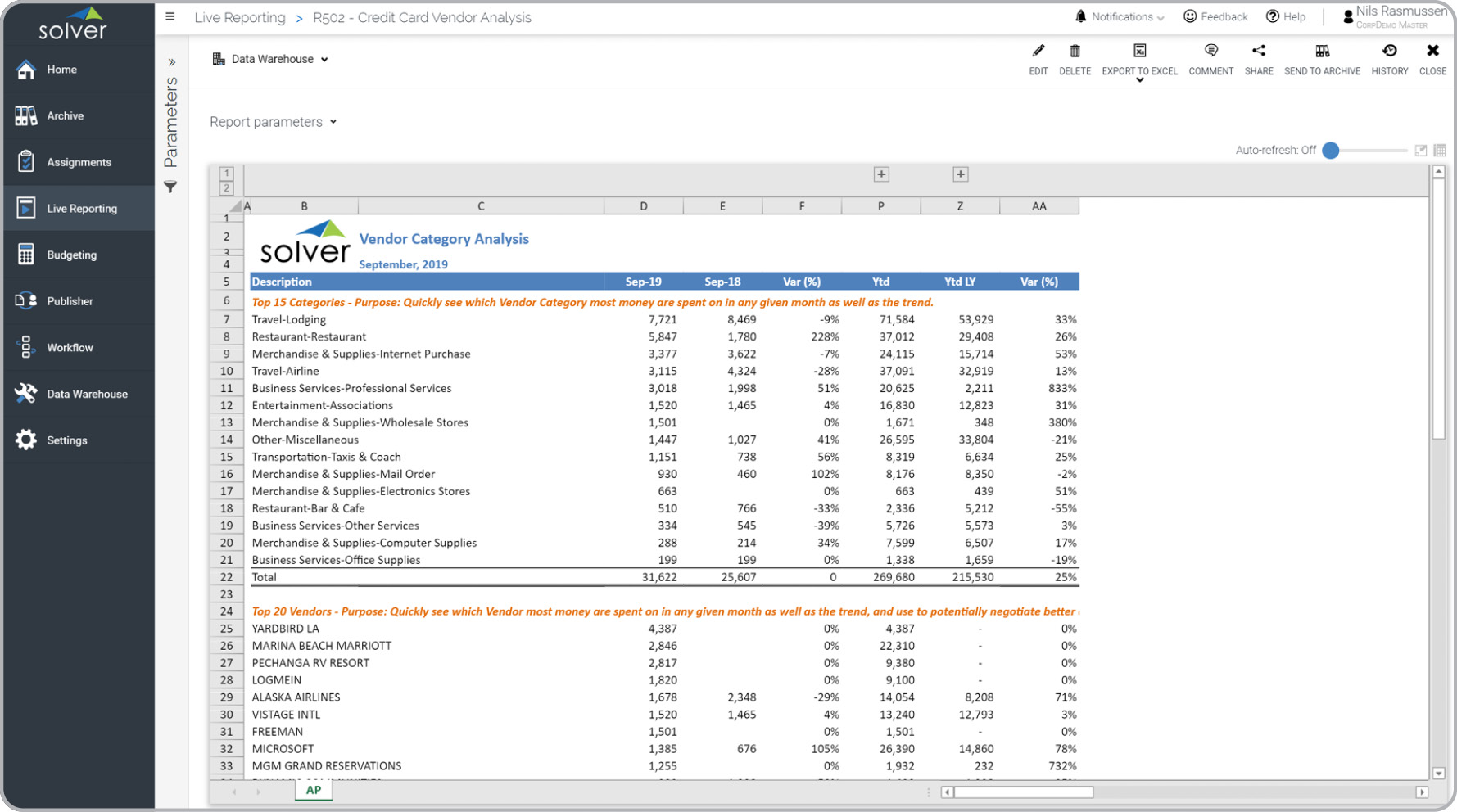
What is a Credit Card Expense Analysis Report by Vendor? Vendor expense reports for corporate credit cards are considered control and analysis tools and are often used by accountants to review which vendors the company is paying with credit cards, how much spending is taking place and trends over time. Some of the key functionality in this type of report is that it is parameter-driven and the columns will display monthly detail for each period in the current and prior year. It also shows the variance in year-to-date (YTD) spending by vendor and category and the variance versus the prior year. The first row section shows expenses by category and the second section shows expenses grouped by vendor and ranked by YTD spend. The YTD columns can be expanded to see the monthly detail. You find an example of this type of report below.
Purpose of Vendor Expense Analysis for Corporate Credit Card Usage Companies and organizations use Vendor Expense Analysis Reports for Corporate Credit Cards to easily track monthly and YTD spend per vendor. This analysis have multiple uses including to negotiate corporate deals with the company's top recurring vendors. When used as part of good business practices in an accounting department, a company can improve its cost control and the bottom line. It can also reduce the chances that lack of credit card expense analysis leads to lost negotiation- or vendor consolidation opportunities.
Who Uses This Type of Report? The typical users of this type of report are: Accountants, CFOs, auditors, analysts. Other Reports Often Used in Conjunction with Vendor Expense Analysis for Corporate Credit Card Usage Progressive accounting departments sometimes use several different Vendor Expense Analysis reports related to corporate credit card usage, along with purchasing reports, vendor dashboards, anomaly reports, exception reports and other management and control tools.
Where Does the Data for Analysis Originate From? The Actual (historical transactions) data typically comes from credit card vendors like American Express (AMEX) and Visa as well as enterprise resource planning (ERP) systems. In analyses where budgets or forecasts are used, the planning data most often originates from in-house Excel spreadsheet models or from professional xFP&A solutions.
This Solver report template connects directly to your ERP data via the Solver Data Warehouse, enabling near real-time analysis with minimal setup. Designed for QuickStart deployment, it can be activated rapidly so your team can focus on analysis and decisions — not data preparation.
What is the Credit Card Expense Analysis in Solver? The Credit Card Expense Analysis is a pre-built xFP&A report template in Solver that delivers key financial and operational metrics in a single, easy-to-use interface, eliminating the need for manual data work or custom report development.
Who uses this Solver report template? Cfos, fp&a managers, and controllers rely on this Solver report template for consistent, parameter-driven reporting that can be run on demand or on a scheduled basis. It eliminates the manual work typically required to produce this type of analysis.
Where does the data come from? Data is sourced automatically from your ERP system through the Solver Data Warehouse. Once connected, the template updates in near real-time with no manual data entry required.
To learn more, visit the Resource Library.