AI-Accelerated xFP&A for Microsoft Dynamics 365 Business Central
Solver works with Microsoft Dynamics 365 Business Central to give finance teams one cloud platform for planning, reporting, consolidation, and analysis. Bring Dynamics 365 Business Central data into a single source of truth, design reports and budget forms in a familiar Excel add-in, and share current insights with decision-makers beyond the finance department.
Based on customer reviews on
![]()
An Application Built for Business Central
Solver is a planning, reporting, and analysis application built for Business Central. The patented Solver QuickStart integration designed for Microsoft Dynamics 365 Business Central gives finance and management users immediate access to a collection of ready-to-use reports and budget models, so your team starts with working content instead of a blank workbook. Find Solver in the Microsoft Marketplace.
Take the Business Central Tour
Watch an in-depth video series that walks through what Solver offers and how the QuickStart integration helps Microsoft Dynamics 365 Business Central users accelerate better decisions.
What Business Central Finance Teams Need from an xFP&A Solution
Shorter budget cycles
Replace emailed workbooks with centralized budget input, automatic task routing, and a workflow and approval engine that keeps every cycle on schedule.
A faster month-end close
Shorten the month-end close with automated workflows that remove the manual steps between your ERP data and final, approved reports.
Reports that flex with the business
Build reports in a flexible designer that supports top-down and bottom-up views across departments, entities, and currencies.
Numbers everyone trusts
Remove data silos and manual spreadsheets with one source of truth, backed by audit controls that track every change.
Plans that respond to change
Model what-if scenarios with dynamic, driver-based forecasts and test strategies before you commit resources to them.
Answers beyond the finance team
Give managers and executives self-serve access to the reports and dashboards they need, without waiting in a request queue.
Business Central Records the Business.
Solver Helps You Plan It.
Microsoft Dynamics 365 Business Central is where your transactions live. The harder question is what those numbers mean for next quarter, and how quickly you can get that answer to the people who need it. When reports, budgets, and forecasts sit in disconnected spreadsheets, finance spends its time compiling instead of advising.
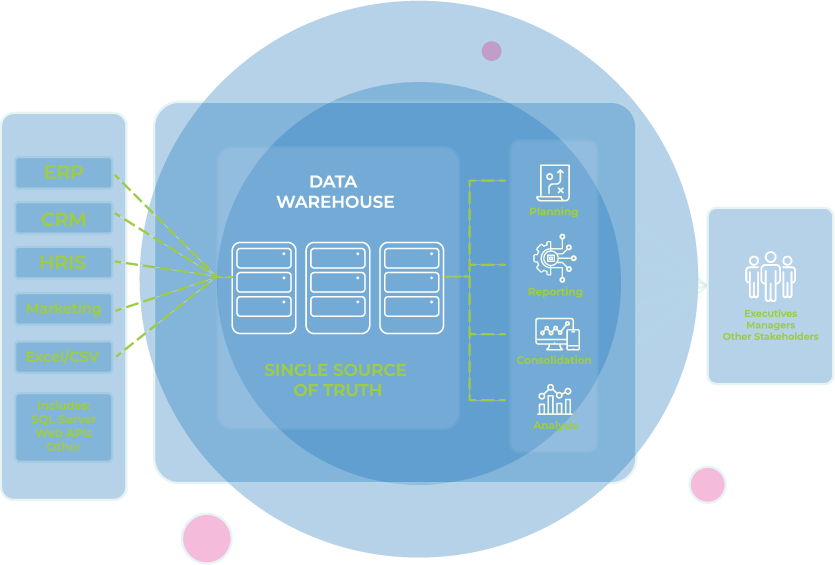
Solver connects Microsoft Dynamics 365 Business Central to a data warehouse that supports unlimited data sources, so financial and operational data sit together in one place. Your team models scenarios, builds forecasts, and delivers reports from the same current data, with every change tracked.
Every Finance Workflow, Connected to Business Central
Reporting, consolidation, budgeting, and analysis on one cloud platform.
-
Financial Reporting
-
Income statements and balance sheets
-
General ledger and sub-ledger reports
-
Operational reports that combine financial and non-financial data
-
Web portal delivery for business users
-
-
Financial Consolidation
-
Multi-entity rollups
-
Built-in currency translation
-
Intercompany eliminations
-
Audit controls on every adjustment
-
-
Budgeting & Forecasting
-
Driver-based budget models
-
What-if scenario modeling
-
Unlimited budget versions
-
Workflow and approvals with automatic routing
-
-
Analysis
-
Shareable graphs and dashboards
-
Trend and anomaly detection with the Analysis Agent
-
Self-serve answers for department managers
-
-
Industries We Serve
-
Construction: Project-level reporting and job-cost visibility
-
Nonprofit: Fund-level reporting and grant budget tracking
-
Healthcare: Community-level reporting and census-driven budgets
-
SaaS: Recurring revenue reporting and headcount forecasts
-
Why Finance Teams Call Solver a Leader in FP&A
G2 users recognize Solver as a Leader for financial planning and analysis, with finance professionals across nonprofit, manufacturing, distribution, and dozens of other industries relying on it daily. Whether you're a mid-market team or a global enterprise, Solver gives you one platform to budget, report, consolidate, and analyze with confidence. Nycole Rosen, VP of Technology at BGSF, put it plainly: "Now, budget season is almost a breeze."
Using Microsoft Fabric with BC?
Solver is part of Microsoft's early adopter program for Business Central data in Microsoft Fabric. Plan, report, and consolidate on governed Business Central data in Fabric alongside every other data source. Learn more about Business Central data in Microsoft Fabric.
Solver for Business Central | Frequently Asked Questions
-
What is a Business Central integration for xFP&A?
An xFP&A integration connects Microsoft Dynamics 365 Business Central to a solution built for extended financial planning and analysis. Solver uses this connection to bring Dynamics 365 Business Central data into one cloud platform for planning, reporting, consolidation, and analysis, so finance and operational leaders work from a single source of truth.
-
How is Solver different from Excel for Business Central reporting?
Solver keeps the Excel design experience your team knows but removes the manual work around it. Reports and budget forms connect to Microsoft Dynamics 365 Business Central data instead of exported files, budget input moves through automated workflow and approvals, and audit controls track every change. Business users view reports through a web portal, which ends version confusion across emailed workbooks.
-
What Business Central data can Solver report on?
Solver supports both general ledger and sub-ledger reports and dashboards for Microsoft Dynamics 365 Business Central. Because Solver includes a data warehouse that supports unlimited data sources, you can also combine Dynamics 365 Business Central data with operational and non-financial data for a complete view of performance across the organization.
-
How does Solver connect to Microsoft Dynamics 365 Business Central?
Solver connects through the patented QuickStart integration designed for Microsoft Dynamics 365 Business Central. QuickStart gives finance and management users immediate access to ready-to-use reports and budget models. Solver is also a Business Central Certified application for planning, reporting, and analysis.
-
How long does it take to implement Solver for Business Central?
QuickStart integrations and ready-to-use templates are built for rapid deployment, helping teams get up and running in days rather than months. Exact timelines depend on the number of entities, data sources, and custom models in scope. Your Solver team or implementation partner can confirm a timeline during scoping.
-
How does Solver Copilot AI help analyze Business Central data?
Solver Copilot AI includes two agents. The Help Agent gives instant answers to product and application questions. The Analysis Agent delivers chart generation, anomaly detection, trend analysis, and predictive recommendations on the data in Solver, including Microsoft Dynamics 365 Business Central data. User input never trains the model. Solver Copilot is available in the United States.